Here, I would try to look at Project Management from the perspective of a Product Manager’s role. It is a key skill for a Product Management professional and helps him/ her execute various key initiatives optimally.
While there is a Project Management Office (PMO) in many large organisations responsible for execution of large – scale projects, the Product Manager is also expected to keep a close tab on the major initiatives under his/ her domain, given that he/ she interacts with multiple stakeholders (internal as well as external) most of whom don’t have a direct reporting to him/ her. There are sophisticated tools such as MS Project that can be mastered for tracking Projects; however not all organisations provide access to them, hence this post looks at an easy – to – understand model that could be used by Product Managers for effectively managing Projects.
Examples of such Projects for Product Managers handling Cash Management Products in Banking shall be a New To Bank Product Launch OR a complex deal solutioning involving significant customization & creativity.
The saying, “When eating an elephant take one bite at a time” is apt when dealing with a complex Project. The approach entails breaking the Task into manageable parts (and further sub – parts) that need to be completed for the Project’s success & tracking each closely. That’s the baseline on which the Project Plan is built. Components of the Project Plan:
Work Breakdown Structure (WBS): The starting point is ‘Work Breakdown Structure’ which simply put is dividing the Project into smaller, manageable tasks. The time to build this framework varies from Project to Project. Sticking to the Cash Management use cases mentioned above, for a Product Launch, it shall be building a Financial Plan/ Cost – Benefit Analysis followed by seeking approvals from internal stakeholders for proceeding with the launch (external tie – ups, any SLAs to be drafted with the client would also need to be factored in, as applicable) and presenting the Solution (proposal/ pitchbook) to the client. In case of customization of an existing Solution, the WBS might require even higher degree of client engagement and the Product Manager would need detailed understanding of Client requirements either through Relationship teams or through Requirement Gathering discussions with Client officials directly.
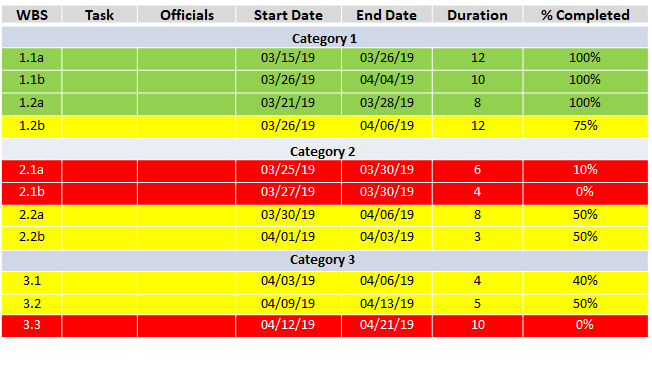
Roles & Responsibilities (R&R): Next in order is a listing of officials responsible for various tasks as per the WBS. For some tasks, joint responsibility would need to be defined.
Start & End dates: As some of the tasks shall be mutually independent, it is possible to have Task 2 starting before Task 1 has been completed & continuing after Task 3 is already executed.
Duration: The likely duration of a task defines the End date assumed in the Project Plan.
% Completion: It is important to keep track of stage of completion of various Tasks and this tab does precisely that. It can also alert the Product Manager in case a Task is not progressing well, since the Project’s success is predicated on timely completion of each Task.
Indicative Go – live date: It is important to have a tentative go – live date in mind subject to the key tasks progressing in tandem, from the perspective of communication to stakeholders.
Color Coding: The conventional Red/ Amber/ Green (RAG) approach is best to define tasks that are completed/ on track/ getting delayed as it is self – explanatory from a visual perspective and also helps in getting timely Management attention, where needed.
Key takeaway: The Project Plan is a journey and the Product Manager needs to continuously engage with all stakeholders to ensure it is executed in a timely and desired manner. There could be tasks/ sub – tasks getting added as the Project progresses and the timelines may also get stretched. It is the Product Manager’s responsibility to manage expectations all along through technical as well as soft skills.
Illustration: An illustration of a Project Plan representing a Product Launch is attached for reference.
Another tool used widely for managing Projects is Gantt Chart. It gives a visual representation of the Project and is very useful for Senior level presentations. Part 2 of this post shall provide an illustration using a Gantt Chart for the tasks covering the same Product Launch example shown here.
Do keep reading this space! Would welcome views/ feedback from you and hope this post was useful.
 Product Management Toolkit